
Butler Consulting Technology, LLC
  • 0 Shopping Cart
  • Home
  • About Us
    • Overview of Services
    • History
    • Founder/CEO
    • Web Services
    • Photography Services
  • Store
    • Browse All
    • Hosting Plans
    • Register a New Domain
    • Transfer Domains to Us
  • Announcements
  • Knowledgebase
  • Network Status
  • Contact Us
  • More
  • Account
    • Login
    • Forgot Password?
  1. Portal Home
  2. Knowledgebase
  3. WHM
  4. WHM (For Resellers)
  5. How to Set Custom/Private Nameservers in WHM

  Categories

Backup/Restore
4
Cloudflare (cPanel)
9
CloudLinux (cPanel)
10
cPanel - Control Panel for Hosting Account Management
29
Databases
12
DirectAdmin
48
DNS - Nameservers
6
Domain Management
10
Email (Includes videos)
57
FileZilla Tutorials - Videos
10
FTP
28
Installing a Control Panel
6
Joomla
7
Mobile
11
MySQL Tutorials - Videos
11
Others
3
PayPal
7
Photo Tools
0
PHPadmin Tutorials (Videos)
8
Plesk
47
Security
10
Softaculous
69
SolusVM
18
SSL
5
Virtualizor
19
Web Browser
1
WHM
18
WordPress
17
WordPress Tutorials
12

  Categories

  Tag Cloud

addons address book admin autorespond backup bookmarks calendar cname configure connection control create database delete dns document domain download email file files filter folders ftp gmail joomla login manage Manage Domain management manager mysql nameserver password permission php quota remote rename repair restore search security server settings software task upload user video virus webmail wordpress yahoo

  Support

My Support Tickets
Announcements
Knowledgebase
Downloads
Network Status
Open Ticket

How to Set Custom/Private Nameservers in WHM Print

  • 0

You can set up custom/private nameservers from WHM.


1. Log in to WHM Account.


2. Go to Server Configuration >> Basic WebHost Manager Setup or type Basic in the menu filter box. The option will appear. Click on it.
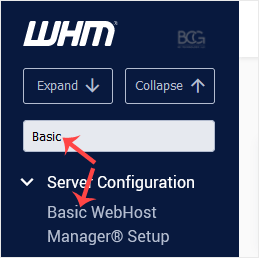
whm-reseller-basic-pmkb-menu.gif


3. Under Nameservers, select Explicitly Set the Nameservers. Enter or change the nameservers. Then click on Save Changes.
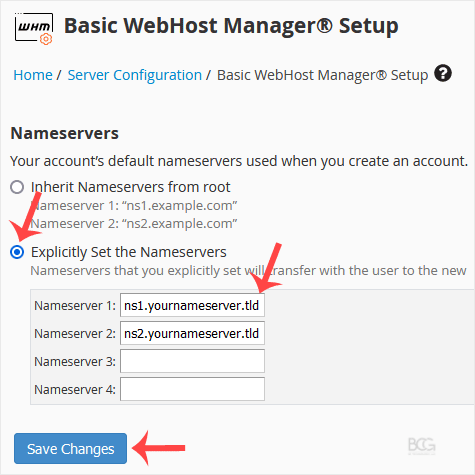
whm-reseller-basic-nameserver-set.gif


Note: Domain propagation takes up to 24 hours.


Was this answer helpful?

Related Articles

How to Suspend a cPanel User in the WHM Account You can suspend cPanel user from accessing your WHM account. 1. Log in to your WHM Account. 2.... How to Limit Bandwidth Usage of cPanel User From WHM Do you want to increase or limit cPanel user's bandwidth usage? A WHM user can modify the... How to Force cPanel Users to Change Their Passwords Using WHM Do you want to force cPanel users to change their passwords after login? If so, follow this... How to Enable/Disable Features of cPanel Account From WHM You can enable/disable features of your customers' cPanel account from WHM. Follow this tutorial... How to Create a Feature List in WHM You can create a feature list from your WHM Account. Feature lists allow you to provide a...
« Back

  Tag Cloud

addons address book admin autorespond backup bookmarks calendar cname configure connection control create database delete dns document domain download email file files filter folders ftp gmail joomla login manage Manage Domain management manager mysql nameserver password permission php quota remote rename repair restore search security server settings software task upload user video virus webmail wordpress yahoo

  Support

My Support Tickets
Announcements
Knowledgebase
Downloads
Network Status
Open Ticket
  • Contact Us
  • Terms of Service

Copyright © 2026 Butler Consulting Technology, LLC. All Rights Reserved.


Loading...
Loading...

Generate Password

Please enter a number between 8 and 64 for the password length